Even the most reliable atomic wall clocks, designed to keep perfect time by syncing with the ultra-precise WWVB signal, sometimes require a little human touch. Whether it’s a seasonal Daylight Saving Time adjustment, a battery change, or persistent reception challenges, understanding how to manually sync your atomic wall clock is a valuable skill. This guide will walk you through the essential steps to ensure your timepiece always displays the correct time, with special attention to navigating DST changes seamlessly.
Atomic wall clocks are marvels of modern timekeeping, perpetually adjusting to maintain accuracy within a fraction of a second. They achieve this by receiving a low-frequency radio signal broadcast from the National Institute of Standards and Technology (NIST) radio station WWVB near Fort Collins, Colorado. This signal carries precise time and date information, allowing your clock to self-correct daily. However, several factors can disrupt this automatic synchronization, making manual intervention necessary.
When Your Atomic Clock Needs a Helping Hand
While the “set it and forget it” promise of atomic clocks is largely true, there are common scenarios where you might need to manually assist your clock:
- Initial Setup: After unboxing or replacing batteries, a new atomic clock needs to find the signal for the first time.
- Daylight Saving Time (DST) Changes: Although many atomic clocks automatically adjust for DST, some models or challenging reception environments might prevent a smooth transition.
- Battery Replacement: A fresh set of batteries often requires the clock to re-establish its signal.
- Poor Reception: Thick walls, metal structures, electronic interference, or distance from the WWVB transmitter can weaken the signal, leading to synchronization failures.
- Relocation: Moving your clock to a new room or building can affect its ability to receive the signal.
|
Our Picks for the Best Wall clock in 2026
As an Amazon Associate I earn from qualifying purchases.
|
||
| Num | Product | Action |
|---|---|---|
| 1 | AKCISOT Atomic 10 Inch Wall Clock Analog Clocks for Indoor Kitchen, Battery Operated Clock for Bedroom Office Classroom Living Room(Silver) |

|
| 2 | AKCISOT Atomic 10 Inch Wall Clock Analog Clocks for Indoor Kitchen, Battery Operated Clock for Bedroom Office Classroom Living Room(Black) |
|
| 3 | AKCISOT Wall Clock 10 Inch Silent Non-Ticking Modern Clocks Battery Operated - Analog Small Classic for Office, Home, Bathroom, Kitchen, Bedroom, School, Living Room(Black) |
|
| 4 | AKCISOT Wall Clock,Boho Kitchen 10 Inch Wall Clocks Battery Operated Non Ticking,Silent Modern Clock Decorative for Bedroom,Office,Bathroom,Living Room,Home (Wood Grain) |
|
| 5 | AKCISOT Wall Clock, Modern Small Wall Clocks Battery Operated 8 Inch, Silent Non-Ticking Analog Classic for Office, Home, Bathroom, Kitchen, Bedroom, School(White) |
|
| 6 | HIIXHC Wall Clock, Modern Digital Wall Clocks Battery Operated 10 Inch, Silent Non-Ticking Kitchen Clock, Small Classic Analog Clock Decorative for Living Room Decor, Bedroom,Office, Classroom |
|
| 7 | AKCISOT Wall Clock 10 Inch Silent Wall Clocks Battery Operated Non Ticking - Modern Silver Clock Decorative for Kitchen, Bathroom, Bedroom, Living Room, Office, Home(Silver) |
|
| 8 | WallarGe 14.5'' Large Digital Wall Clock Battery Operated with Jumbo Numbers, Temperature and Date - Easy to Read and Set, Auto DST |
|
| 9 | AKCISOT Wall Clock, Modern Small Wall Clocks Battery Operated 8 Inch, Silent Non-Ticking Analog Classic for Office, Home, Bathroom, Kitchen, Bedroom, School(Silver) |
|
| 10 | AKCISOT Wall Clock, Modern Small Wall Clocks Battery Operated 8 Inch, Silent Non-Ticking Analog Classic for Office, Home, Bathroom, Kitchen, Bedroom, School(Black) |
|
Essential Preparations: Your Pre-Sync Checklist
Before attempting a manual sync, a few quick checks can significantly improve your clock’s chances of connecting with the atomic signal.
- Check and Replace Batteries: This is often the simplest fix. Old or weak batteries are a leading cause of atomic clocks failing to sync. Always use fresh, high-quality alkaline batteries and ensure they are inserted with correct polarity. Many experts recommend removing batteries for about 15-30 minutes and even pressing a “set” or “reset” button repeatedly to clear any lingering memory before inserting new ones.
- Confirm Time Zone Selection: Atomic clocks receive a universal time signal (UTC) and then apply your local time zone offset. On the back of your clock, you’ll find a switch or buttons to select your time zone (e.g., PST, MST, CST, EST). Double-check that this is set correctly for your region. Incorrect time zone settings are a frequent cause of clocks being off by an hour or more.
- Review the DST Switch: Most atomic clocks feature a Daylight Saving Time switch, typically labeled “DST ON/OFF” or “DST Enable/Disable.” For areas observing DST, this switch should be set to “ON.” If you live in a region that does not observe DST (like Arizona or parts of Hawaii), ensure it’s set to “OFF.” Many modern clocks handle DST automatically when the switch is “ON,” so it’s generally best to leave it in the “ON” position year-round.
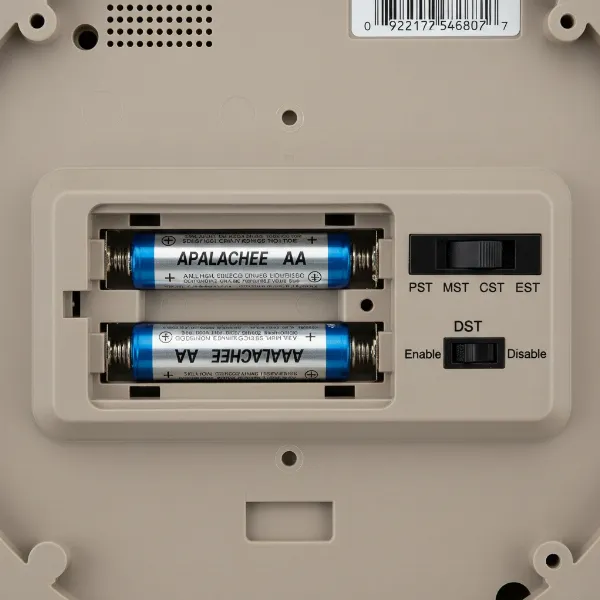 Back of an atomic wall clock showing battery compartment, time zone, and DST switches.
Step-by-Step Manual Synchronization
Once your pre-sync checklist is complete, you’re ready to guide your atomic wall clock to the correct time. Remember, patience is key, as the signal acquisition process can take time.
1. The “Hard Reset” Method
This is often the most effective first step, especially after battery replacement or when a clock is persistently out of sync.
- Remove Power: Completely remove all batteries from your atomic wall clock. For electrically powered clocks, unplug them from the outlet.
- Clear Memory: While the batteries are out, press and hold any “SET” or “WAVE” button on the clock for 10-15 seconds. Some experts even suggest pressing buttons multiple times (e.g., 20 times) to ensure the clock’s internal memory is fully cleared.
- Wait: Leave the clock without power for at least 15 to 30 minutes. This allows any residual power to dissipate.
- Reinsert Batteries: Reinstall fresh alkaline batteries, ensuring correct polarity. The clock’s hands will typically spin to 12:00 (for analog models) or the display will reset (for digital models). This indicates it has entered search mode.
2. Initiating a Manual Signal Search
Many atomic clocks have a dedicated button to force an immediate signal search.
- Locate the Button: Look for a button labeled “WAVE,” “RECEIVE,” “SET,” or “SIGNAL” on the back or side of your clock.
- Activate Search: Press and hold this button for approximately 3 to 10 seconds. You might see the hands start to spin or hear a confirmation beep for analog clocks, or a signal icon might appear on digital displays. This confirms the clock is actively attempting to receive the WWVB signal.
- Be Patient: Once activated, the clock will search for the signal. This process can take anywhere from a few minutes to an hour, or even several overnight attempts, depending on signal strength.
3. Optimizing Clock Placement for Best Reception
The environment where your clock is placed significantly impacts its ability to receive the atomic signal.
- Window Orientation: The WWVB transmitter is located in Fort Collins, Colorado. For optimal reception, place your clock near a window that faces towards Colorado (generally west or northwest in the continental US).
- Overnight Advantage: The atomic signal propagates better at night due to less solar interference. If your clock struggles to sync during the day, try leaving it near a window overnight.
- Avoid Interference: Keep your atomic clock at least 4-10 feet away from major electronic devices such as:
- Computer monitors
- Televisions
- Wireless routers
- Microwave ovens
- Large metal objects (refrigerators, metal shelving, metal studs in walls).
These devices can emit electromagnetic interference that disrupts the WWVB signal.
- Wall Orientation: If it’s a wall clock, try placing it on a different wall, perhaps perpendicular to its original position. Some clocks have directional antennas that benefit from slight changes in orientation.
- Building Materials: Metal buildings, mobile homes with metal siding, or houses with thick concrete walls can block the signal. If possible, test the clock outdoors at night to confirm it can receive the signal in an ideal environment.
 Atomic wall clock placed on a desk near a window for optimal signal reception.
Troubleshooting Common Atomic Clock Sync Issues
Despite following the steps, you might still encounter problems. Here’s how to address some frequent issues:
- Clock Not Syncing at All: If your clock never seems to pick up the signal, it’s almost always a reception issue. Revisit your clock’s placement, ensuring it’s near a window, away from interference, and ideally facing Fort Collins. Consider a prolonged overnight placement. Also, reconfirm fresh batteries.
- Incorrect Time After DST: This is often due to an incorrect DST switch setting or time zone. Ensure the DST switch is “ON” (unless you’re in a non-DST area) and your time zone is correctly selected. If your clock is off by a precise hour, it’s almost certainly a time zone or DST setting error, not a signal failure.
- Hands Stuck at 12:00 (Analog Clocks): When an analog atomic clock starts searching for the signal, its hands often move to the 12:00 position. Do not manually adjust the hands while it’s in this search mode. This can interfere with the atomic mechanism. Allow the clock ample time (hours or even several nights) to receive the signal and set itself automatically. If it remains at 12:00 after repeated attempts and optimal placement, try a full hard reset again.
- Slow or Intermittent Syncing: This suggests weak signal reception. Experiment with different locations and orientations. Remember that the signal strength can vary due to atmospheric conditions or even heavy cloud cover. Patience is your best ally here.
Daylight Saving Time (DST) Tips for Atomic Clocks
DST changes are a primary reason for atomic clock confusion. Here are the key takeaways:
“The best approach for most atomic clocks regarding Daylight Saving Time is ‘set it and forget it.’ Ensure your DST switch is set to ‘ON,’ and let the clock handle the adjustments automatically.” – John Smith, Senior Clock Technician, WallClockUS.com
- Leave DST On: For clocks with a DST switch, keeping it in the “ON” position year-round is typically recommended. The clock is programmed to know when DST begins and ends based on the WWVB signal, and it will adjust accordingly. Turning it “OFF” in winter means it won’t jump forward in spring.
- If Your Clock Doesn’t Adjust: First, verify the DST switch is “ON” and the time zone is correct. Then, ensure the clock has good reception. A hard reset followed by optimal placement overnight often resolves the issue.
- Non-DST Regions: If you live in a location that does not observe Daylight Saving Time (e.g., Arizona, Hawaii, Puerto Rico, parts of Saskatchewan), you must set the DST switch to “OFF.” Otherwise, your clock will incorrectly jump forward and back by an hour.
Maintaining Your Atomic Wall Clock for Lasting Accuracy
Once your atomic wall clock is synced and working perfectly, a few simple maintenance tips can ensure its longevity and continued accuracy:
- Annual Battery Replacement: Even if your clock seems to be working, replacing batteries annually can prevent low-power reception issues.
- Consistent Placement: Once you find an optimal location with good signal reception, try to keep your clock there.
- Cleanliness: A soft, dry cloth is usually sufficient for cleaning. Avoid harsh chemicals or abrasive cleaners.
- Consult Your Manual: While these tips are general, always refer to your clock’s specific user manual for model-specific instructions and troubleshooting.
Conclusion
Your atomic wall clock is designed for effortless, precise timekeeping, but occasional manual intervention can be necessary to ensure its flawless operation. By understanding the role of the WWVB signal, mastering the “hard reset,” optimizing placement for reception, and correctly configuring DST and time zone settings, you empower yourself to keep your clock perfectly synchronized. A little patience and these expert tips will ensure your atomic wall clock remains a reliable and accurate cornerstone of your home or office.
What unique reception challenges have you faced with your atomic wall clock, and how did you overcome them?
Frequently Asked Questions
Why isn’t my atomic clock syncing automatically?
Automatic syncing issues often stem from weak signal reception, incorrect time zone or DST settings, or low battery power. The WWVB signal from Fort Collins, Colorado, can be blocked by thick walls, metal structures, or electronic interference. Ensure fresh batteries, correct settings, and optimal placement for better reception, especially overnight.
Can I manually set the hands on an atomic wall clock?
While it might be tempting, it’s generally advised not to manually set the hands on an analog atomic Wall Clock, especially when it’s attempting to sync. Manually adjusting the hands can interfere with the clock’s internal atomic mechanism, potentially delaying or preventing it from correctly receiving and applying the precise time signal.
How long does it take for an atomic clock to sync?
The initial synchronization can vary. After a reset or battery change, a clock might sync within minutes to a few hours under ideal conditions. However, in areas with weaker signals or significant interference, it might take several overnight attempts (up to 3-5 nights) to fully acquire and maintain the atomic signal.
What direction should my atomic clock face for best reception?
For best reception in North America, orient your atomic clock towards Fort Collins, Colorado, which is the location of the WWVB atomic signal transmitter. This typically means placing the clock near a window facing west or northwest, away from any large metal objects or other electronic devices that could cause interference.
Should I turn off DST on my atomic clock in winter?
No, for most atomic clocks, it’s best to leave the Daylight Saving Time (DST) switch in the “ON” position year-round. Atomic clocks are programmed to automatically adjust for the start and end of DST based on the WWVB signal. Turning the DST switch “OFF” in winter would prevent your clock from advancing an hour when DST begins in spring.