The precision and convenience of an atomic wall clock are unparalleled, offering accurate timekeeping without the need for constant adjustments. Yet, few things are as frustrating as looking at your atomic clock only to find it stubbornly displaying the wrong time zone. This common issue can undermine the very purpose of owning such a device, leaving you wondering why your advanced clock can’t seem to get this fundamental setting right. Understanding the mechanics behind these clocks and common missteps is the first step toward reclaiming accurate time in your home or office.
The Foundation: How Atomic Clocks and Time Zones Work
At the heart of every atomic clock in North America is the WWVB radio signal, broadcast from Fort Collins, Colorado, by the National Institute of Standards and Technology (NIST). This signal carries precise time data, including the exact hour, minute, and second, ensuring unparalleled accuracy. However, a crucial detail often misunderstood is that the WWVB signal itself transmits only Coordinated Universal Time (UTC) and information about Daylight Saving Time (DST)—it does not transmit time zone information.
This means your atomic clock is designed to receive the universal time and then, based on an internal setting you select, apply the correct offset for your local time zone. When this time zone setting is incorrect, or if there are issues preventing the clock from properly interpreting the signal or its own settings, your clock will appear to be in the wrong time zone. The system relies on a seamless interaction between a powerful broadcast and your clock’s correct configuration.
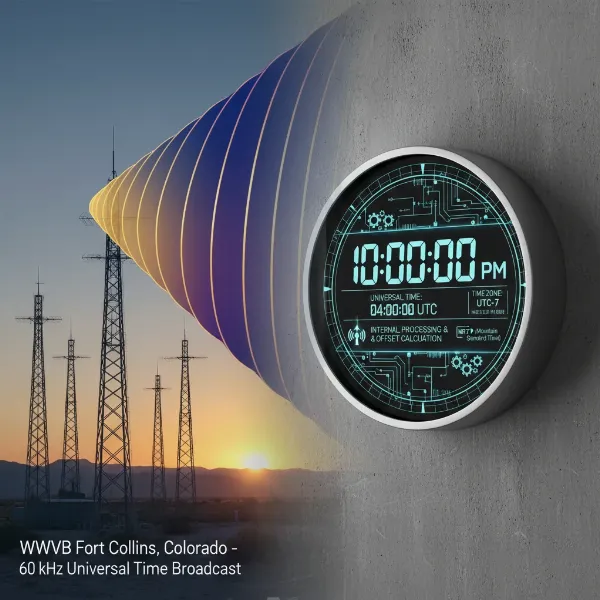 atomic clock receiving WWVB signal and adjusting to correct time zone
Top Reasons Your Atomic Clock Shows the Incorrect Time Zone
Several factors can lead to your atomic wall clock displaying an hour that’s not quite right for your location. Identifying the root cause is key to a swift resolution.
Initial Setup Errors
|
Our Picks for the Best Wall clock in 2026
As an Amazon Associate I earn from qualifying purchases.
|
||
| Num | Product | Action |
|---|---|---|
| 1 | AKCISOT Wall Clock, Modern Small Wall Clocks Battery Operated 8 Inch, Silent Non-Ticking Analog Classic for Office, Home, Bathroom, Kitchen, Bedroom, School(White) |

|
| 2 | AKCISOT Wall Clock, Modern Small Wall Clocks Battery Operated 8 Inch, Silent Non-Ticking Analog Classic for Office, Home, Bathroom, Kitchen, Bedroom, School(Silver) |
|
| 3 | AKCISOT Wall Clock 10 Inch Silent Wall Clocks Battery Operated Non Ticking - Modern Silver Clock Decorative for Kitchen, Bathroom, Bedroom, Living Room, Office, Home(Silver) |
|
| 4 | AKCISOT Atomic 10 Inch Wall Clock Analog Clocks for Indoor Kitchen, Battery Operated Clock for Bedroom Office Classroom Living Room(Black) |
|
| 5 | AKCISOT Wall Clock,Boho Kitchen 10 Inch Wall Clocks Battery Operated Non Ticking,Silent Modern Clock Decorative for Bedroom,Office,Bathroom,Living Room,Home (Wood Grain) |
|
| 6 | WallarGe 14.5'' Large Digital Wall Clock Battery Operated with Jumbo Numbers, Temperature and Date - Easy to Read and Set, Auto DST |
|
| 7 | AKCISOT Atomic 10 Inch Wall Clock Analog Clocks for Indoor Kitchen, Battery Operated Clock for Bedroom Office Classroom Living Room(Silver) |
|
| 8 | HIIXHC Wall Clock, Modern Digital Wall Clocks Battery Operated 10 Inch, Silent Non-Ticking Kitchen Clock, Small Classic Analog Clock Decorative for Living Room Decor, Bedroom,Office, Classroom |
|
| 9 | AKCISOT Wall Clock 10 Inch Silent Non-Ticking Modern Clocks Battery Operated - Analog Small Classic for Office, Home, Bathroom, Kitchen, Bedroom, School, Living Room(Black) |
|
| 10 | AKCISOT Wall Clock, Modern Small Wall Clocks Battery Operated 8 Inch, Silent Non-Ticking Analog Classic for Office, Home, Bathroom, Kitchen, Bedroom, School(Black) |
|
One of the most frequent culprits is an incorrect time zone selection during the clock’s initial setup. Many atomic clocks, while automatically synchronizing the time, require you to manually choose your specific time zone (e.g., Pacific, Mountain, Central, Eastern). If this step is overlooked or set incorrectly, the clock will accurately display the time for the chosen zone, not necessarily your actual zone.
Poor Signal Reception
The WWVB signal, while powerful, is a radio signal and susceptible to interference. Obstructions like thick walls, large metal objects, or other electronic devices (TVs, computers, Wi-Fi routers) can degrade or block the signal. Distance from Fort Collins, Colorado, can also play a role, as the signal naturally weakens further away. If your clock isn’t receiving a clear, consistent signal, it might fail to update time information correctly, including DST changes, leading to an hour discrepancy.
Daylight Saving Time (DST) Discrepancies
Daylight Saving Time often introduces challenges. Some atomic clocks automatically adjust for DST, while others have a manual switch or require specific configuration. If your clock fails to enable or disable DST when it should, or if you live in a region that doesn’t observe DST (like Arizona or Hawaii) but your clock is set to automatically adjust, you’ll encounter an hour difference. Conversely, a clock may fail to adjust for DST if it experiences poor signal reception during the transition period.
Manual Override Issues
While atomic clocks are designed for automation, many offer manual override options for time and time zone settings. Sometimes, accidental presses or incorrect manual adjustments can override the atomic synchronization, leading to an persistent incorrect time zone display. It’s easy to make a small error that the clock then adheres to until properly reset.
Battery Power
Low or depleted batteries can significantly impact an atomic clock’s performance. Insufficient power can hinder the clock’s ability to search for, receive, and process the WWVB signal, or even to maintain its internal time zone settings. A weak battery might not outright stop the clock, but it can cause intermittent reception issues or prevent necessary updates.
Troubleshooting Steps to Correct Your Atomic Clock’s Time Zone
When your atomic clock is showing the wrong time zone, don’t despair. A systematic approach to troubleshooting can often resolve the issue quickly.
Verify Time Zone Setting
This is always the first and most critical step. Consult your clock’s user manual to locate the time zone setting switch or button. Ensure it is correctly set for your geographical location. Some clocks use abbreviations (e.g., PST, MST, CST, EST), while others might use numbers or full names. Double-check that it corresponds precisely to your local time zone.
Perform a Full Reset
A full reset can clear any erroneous memory settings or glitches.
- Remove all batteries from the clock.
- Wait at least 15 minutes. For some models, pressing various buttons repeatedly (e.g., 20 times) while batteries are out can help fully discharge any residual power and clear memory.
- Insert fresh, high-quality alkaline batteries. Ensure they are correctly oriented according to polarity markings.
- Re-select your time zone immediately after inserting batteries, if prompted or if there’s a physical switch.
- Allow the clock to resynchronize. This process can take several minutes to several hours, especially if the signal is weak or during daytime.
Optimize Clock Placement
Improving signal reception is crucial.
- Move the clock near a window, ideally one facing in the general direction of Fort Collins, Colorado (west-southwest for most of the U.S.).
- Keep the clock away from electronic devices that emit radio frequencies, such as televisions, computers, Wi-Fi routers, microwaves, and even large metal appliances.
- The WWVB signal is often strongest at night due to atmospheric conditions, so patience might be required for the clock to pick up the signal after relocation.
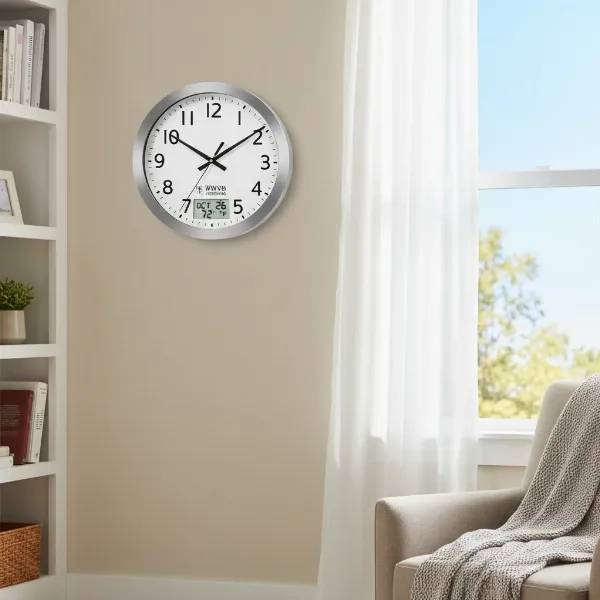 atomic clock placed near a window for optimal signal reception
Check DST Settings
Ensure your clock’s Daylight Saving Time setting is correct for your area.
- If your region observes DST, ensure the “DST” function or switch on your clock is set to “ON” or “Auto.”
- If your region does not observe DST, confirm the “DST” setting is “OFF.” In some cases, if your clock doesn’t have an “OFF” option and you’re in a non-DST area, you might need to select an adjacent time zone that naturally provides the correct offset.
Force a Signal Search
Many atomic clocks have a feature to manually initiate a search for the WWVB signal. This is often done by pressing and holding a specific button (commonly labeled “WAVE,” “SET,” “SYNC,” or sometimes the “UP” or “+” button) for a few seconds. Refer to your manual for the exact procedure for your model. A flashing signal icon usually indicates that the clock is actively searching.
What to Look For When Buying an Atomic Wall Clock
If you’re in the market for a new atomic wall clock, keeping certain features in mind can help you avoid time zone woes down the line.
- Clear Time Zone Selector: Look for models with an easily accessible and clearly labeled time zone switch or button. Some clocks number time zones, others use abbreviations; clarity is key.
- DST On/Off Switch: A dedicated switch or clear setting for Daylight Saving Time allows you to easily enable or disable this feature as needed, particularly useful if you live in a non-observing region.
- Signal Strength Indicator: A display that shows the strength of the received WWVB signal can be invaluable for troubleshooting. It helps you quickly determine if a time discrepancy is due to poor reception.
- Manual Override for Time: While the primary benefit is automatic sync, the ability to manually set the time and time zone can be a lifesaver in areas with persistent signal issues or for initial setup.
Expert Tips for Consistent Accuracy
Achieving consistent, hands-off accuracy with your atomic clock extends beyond initial setup. Implement these expert tips for optimal performance.
- Regular Battery Changes: Even if your clock appears to be working, batteries can degrade over time, affecting signal reception before they completely die. Replace batteries annually or whenever you notice inconsistent behavior.
- Understanding WWVB Broadcast: The WWVB signal transmits data over a full minute. Be patient when setting up or after a reset; it can take time for your clock to receive and fully process the complete time code. The strongest signals are often received overnight.
- Location, Location, Location: Prioritize locating your atomic clock where it has the best possible line of sight to the WWVB signal. Experiment with different windows or walls, and be mindful of large electronic devices or metal structures that might act as shields.
“A common misconception is that the atomic clock signal tells the clock its time zone. In reality, the clock always needs a time zone selection from the user to correctly interpret the universal time it receives.” – Wallclockus Admin, Wall Clock Technician with 10+ Years Experience
Conclusion
An atomic Wall Clock offers the ultimate in timekeeping convenience, designed to provide flawless accuracy. When your clock consistently displays the wrong time zone, it’s typically not a fault with the atomic signal itself but rather an issue with the clock’s settings, its environment, or its ability to receive the synchronization signal. By understanding how these remarkable devices work and applying the troubleshooting steps outlined, you can resolve most common time zone discrepancies. Remember to verify your time zone settings, ensure optimal signal reception, and perform a full reset when in doubt. With a little attention, your atomic clock will once again become a reliable and precise fixture in your daily life.
What steps will you take to ensure your atomic clock always shows the correct time?
Frequently Asked Questions
Why does my atomic clock keep reverting to the wrong time zone?
If your atomic clock repeatedly reverts to the wrong time zone, it often indicates persistent poor signal reception. The clock might be failing to receive a strong enough WWVB signal to confirm its time settings, or there could be an internal battery issue causing it to lose saved settings. Try relocating the clock, ensuring fresh batteries, and performing a full reset to re-establish a stable connection.
How far does the WWVB signal reach?
The WWVB signal, broadcast from Fort Collins, Colorado, is designed to cover the contiguous United States, parts of Canada, and Mexico. While it theoretically reaches these vast areas, signal strength can vary greatly depending on geographical distance, local terrain, atmospheric conditions, and interference from buildings or electronics. Clocks further from the transmitter may experience weaker reception.
Can I manually set my atomic clock’s time zone?
Yes, most atomic clocks require you to manually select your time zone. While the clock automatically synchronizes the exact time (hours, minutes, seconds) via the WWVB signal, the time zone offset is typically a user-selected setting on the device itself. Always check your clock’s instruction manual for specific guidance on how to adjust this setting.
What if my region doesn’t observe Daylight Saving Time?
If you live in a region that does not observe Daylight Saving Time (e.g., Arizona, Hawaii), you will need to ensure your atomic clock’s DST setting is turned “OFF.” If your clock automatically adjusts for DST and doesn’t have an explicit “OFF” switch, you might need to select an adjacent time zone that naturally provides the correct time offset during DST periods to compensate.
How often should I change the batteries in my atomic clock?
While battery life varies, it’s generally recommended to change the batteries in your atomic clock annually, or whenever you notice any inconsistent behavior, such as a failure to synchronize, incorrect time zone display, or a dimming display. Fresh batteries ensure the clock has sufficient power to consistently receive and process the WWVB signal.